What is the RuneFrame?
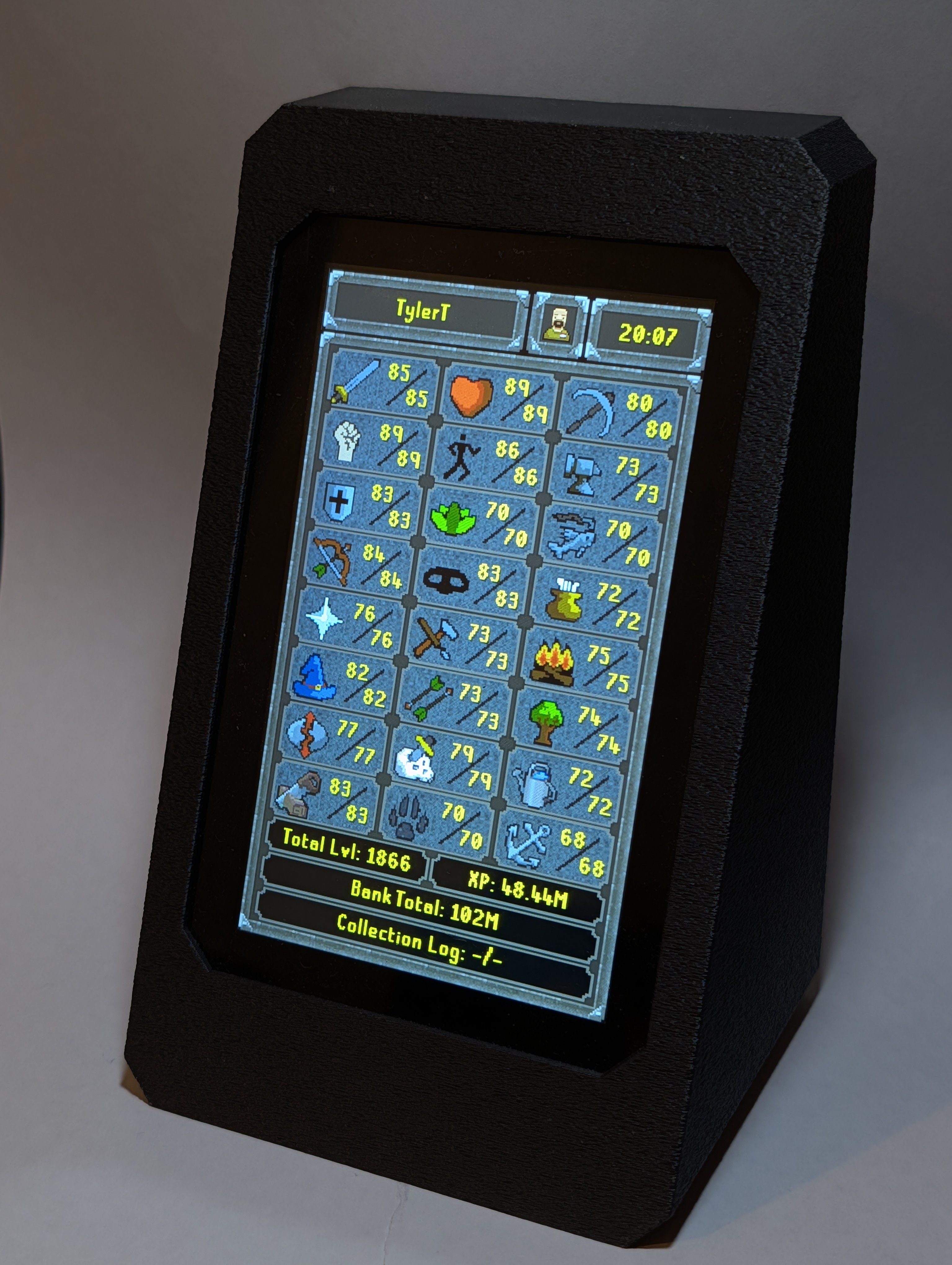
The RuneFrame displays your OSRS skills and a range of account stats, updating in real time as you play. Powered by USB-C and built around an ESP32, it syncs with OSRS through a custom RuneLite plugin and the public OSRS API.
- Real Time Skill Tracking: Watch your skills, total level and total XP update as you play.
- Level-Up Alerts: Celebrate every level with instant on-screen notifications whenever you hit a new milestone.
- Track Multiple Characters: Track a single character like your main or automatically follow and switch to whichever character you're currently playing.
- Customizable Tracking: Track the things that matter to you, from total bank value and quest completion to collection log progress, combat tasks, a specific 99, or your journey to max. (If you dare, you can even put your hours played on display.)
Everything RuneFrame Can Do
Click to expand each section to explore the firmware capabilities.
Live Skill Progress
Customizable Bottom Stat Rows
In-Game Milestone Notifications
Touch Screen & Easy Setup
Setup a Sleep Schedule
Seamless Wireless Updates
Build Your Own RuneFrame
RuneFrame is a personal, fan-made OSRS project that I originally built for myself. I'm sharing the project so other players can build their own using the files, guides, and hardware information provided.
How to Build One
- Support the project on Patreon to access the 3D print files for the case, assembly guides, hardware sourcing links, and RuneFrame Installation Tool.
- Print your case, source the components, and assemble your RuneFrame by following the step-by-step guide.
- Plug your assembled device into your computer via USB-C and use the RuneFrame Installation Tool to install the software.
Don't Have a 3D Printer?
You can still build your own RuneFrame! If you don't have access to a 3D printer, I can send you a 3D-printed case for the ESP32-S3 i used which is listed in the creation guide. You'll purchase the case separately, then source the remaining components and assemble your RuneFrame yourself. The case is simply a 3D-printed part to help with the DIY build. you're still building the RuneFrame yourself.
Patreon membership is only required to access the installation tool. Once RuneFrame is installed, you can continue using it and receiving software updates even if you later stop supporting the project.
Support the Project on Patreon
Patreon helps support development of the project and gives supporters access to the resources needed to build their own RuneFrame, including the installation tool. Patreon membership is only required when using the installation tool.
- Complete 3D print files for the custom case
- Direct component sourcing links
- Step-by-step assembly guides
- Access to the RuneFrame installation tool
- Help shape future features and updates
RuneFrame Installation Tool
This is the tool I use to install RuneFrame onto an ESP32-S3. I'm making it available to Patreon supporters who want to build their own and help support the continued development of the fan project. Once installed, RuneFrame continues to work and receive updates even if you later stop supporting the project on Patreon.
Open Installation Tool